Make your videos
recognisably yours.
Custom video editing templates and motion systems built around your brand, your content and the way you actually work — for Final Cut Pro, DaVinci Resolve and Premiere Pro.
Show me what you needA reusable creative system
This isn’t another template pack.
Off-the-shelf libraries are useful when you want something quick and affordable. Bespoke templates are for when you want a system built around you: your brand, your content and your workflow.
The value is in what happens next. A good template can be used across dozens, hundreds or thousands of pieces of content, giving a team consistency and removing repetitive work from the production process.

Built for the software you already use
I build custom templates for Final Cut Pro using Motion, DaVinci Resolve and Adobe Premiere Pro. The software follows your existing workflow; the graphics, controls and reusable system are designed around your brand and the content you make.
What I can build
From a single recurring graphic to a complete toolkit, each element can share one recognisable visual language.
- Main titles
- Lower thirds
- Social CTAs
- Chapter cards
- End screens
- Logo animations
- Branded transitions
- Intro and outro systems
- Creator graphics
- Complete template toolkits
An illustrative system
From one animation to a visual language
Reusable branded templates for Appercept, including an intro, chapter separator, lower third and end screen. A consistent visual system their team can use across future video projects.
View the full project
A reusable Final Cut Pro toolkit for Nerding Out, with an intro, overlay, chapter separator and end screen. Four connected templates that carry the channel’s visual identity across its videos.
“Does an excellent job! Really listened to my wants and found me the best package for my project. Delivered it in a timely manner, and was very smooth and just what I asked for!”
KAMARA WORLD
Built to fit the way you share it.
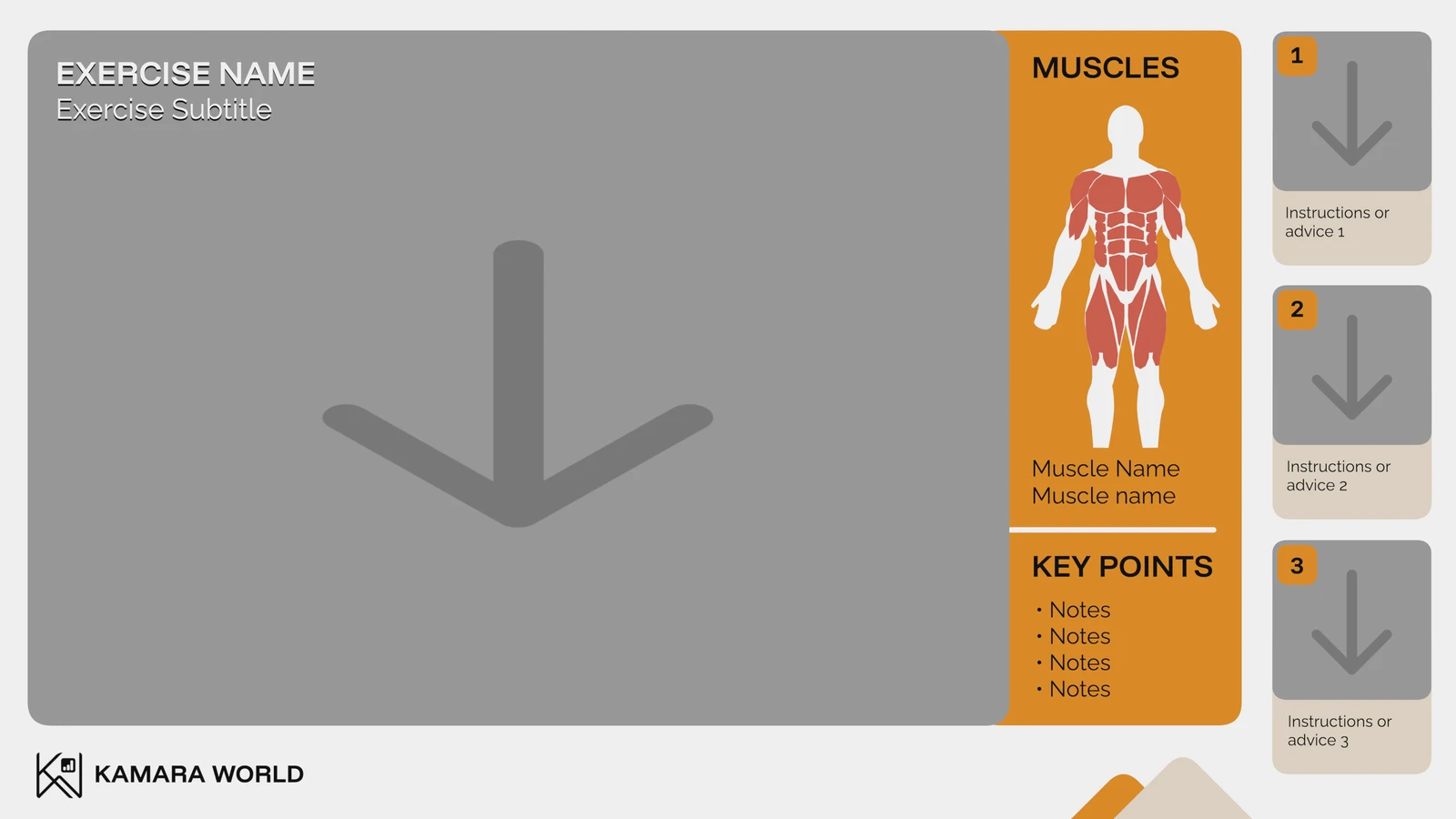
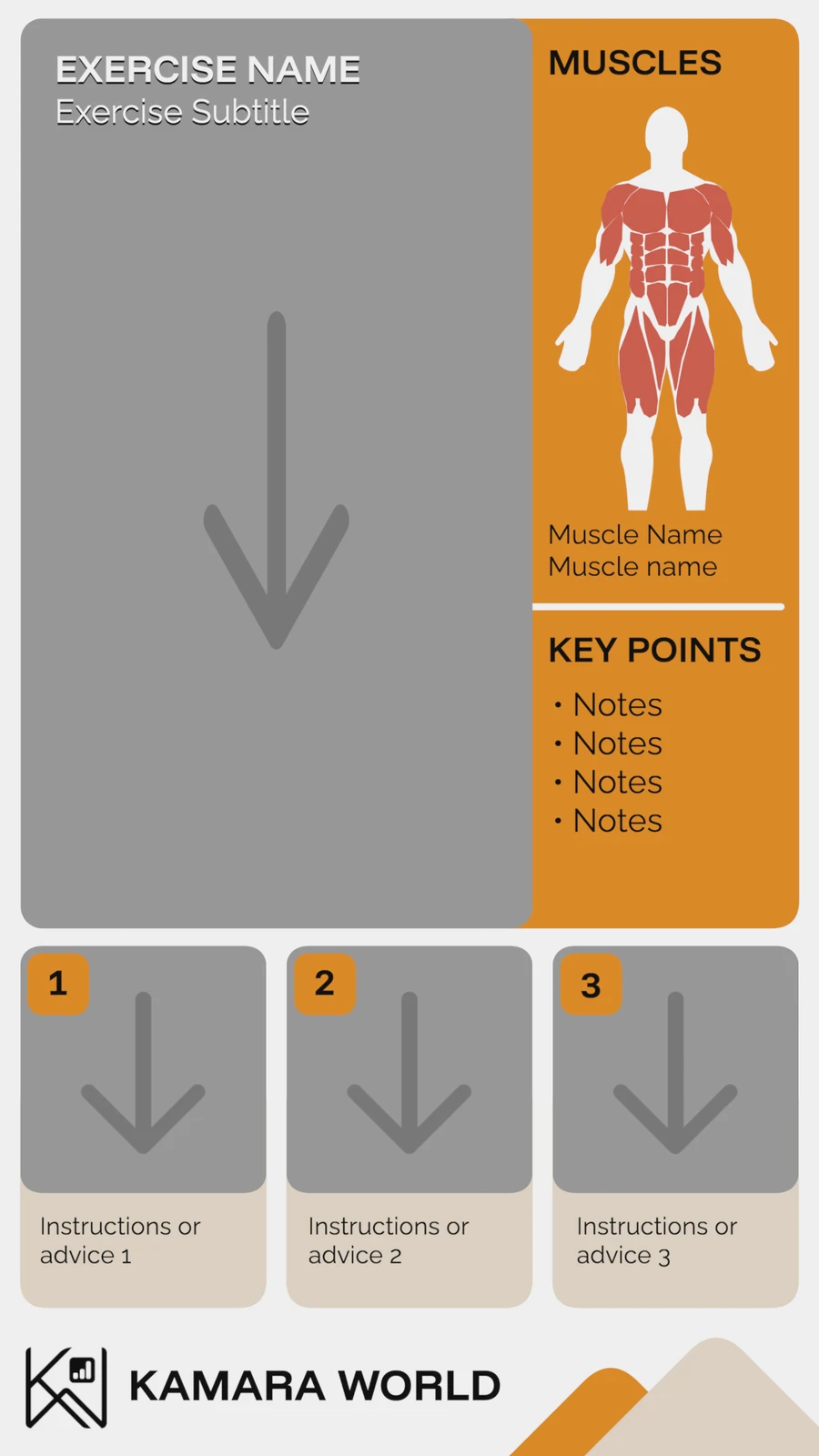
A template can be configured around different project formats and channels. For KAMARA WORLD, I built a Final Cut Pro fitness template that automatically rearranges its layout when placed in a landscape 16:9 or portrait 9:16 timeline.
The creator can add exercise imagery, edit text, fonts and colours, and choose which muscle groups to highlight. The same template adapts its elements to the frame.
The right controls, at your fingertips
Each template includes intuitive controls in Final Cut Pro’s inspector, so you can customise it without touching node graphs of After Effects. Just drop it into your timeline and adjust the settings to suit your project.
Controls are tailored to each template and may include text, fonts, colours, positioning or 3D settings such as rotation and lighting.

Custom Final Cut Pro template work for Alex On Road. This example shows the graphics in use, bringing a consistent visual identity into the channel’s content.
“I am absolutely delighted with the quality and the collaboration with Charlie. A professional standard with a deep understanding of my work. Always a pleasure.”
How it works
- Understand. We look at your brand, content and workflow.
- Design. We decide what should become reusable.
- Build. I create the templates in your chosen software.
- Test. We check them in real production.
- Hand over. You receive a practical system your team can use.
Questions about custom templates
Can you build templates for all three platforms?
Yes. I build custom templates for Final Cut Pro using Motion, as well as DaVinci Resolve and Premiere Pro. We choose the platform around your workflow and confirm the software version and any dependencies before starting.
Can you build a complete system rather than one animation?
Yes. Titles, lower thirds, chapter cards, transitions and end screens can share one visual language, with controls suited to the content you make repeatedly.
Can templates be simple enough for non-designers?
Yes. We can make the everyday controls straightforward, such as changing text, colours and images, while keeping the underlying design consistent. The options depend on your editing software.
Can you recreate an existing design as an editable template?
Yes, where the design is technically suitable and you have permission to use it. Share the design and explain what you need to change in each video so I can assess the best approach.
How much does a custom template cost?
The price depends on the complexity, number of templates and workflow requirements. Send a brief or an example and I can scope the work and provide a quote.
Client reviews
“Great working with Charlie on a detailed, quick-turn-around project that he nailed first try. Excellent communication and attention to my documentation throughout. A pleasure!”
“Absolutely amazing! Charlie was able to completely nail what I needed with this lower third animation for a corporate medical client and he delivered it RIGHT away even amidst his other client work. True professional there! He also paid such close attention to what I needed specifically (where the paint swatch "wipes" in, like a real painter would), it turned out great. I'll definitely be coming back for any other Fusion animations I need done.”
“I am absolutely delighted with the quality and the collaboration with Charlie. A professional standard with a deep understanding of my work. Always a pleasure.”
“Does an excellent job! Really listened to my wants and found me the best package for my project. Delivered it in a timely manner, and was very smooth and just what I asked for!”
“I was very impressed with the quality of his work and how quickly he got it done. I'll be sure to use his services down the road when I need more custom stuff created! Thank you so much! I'm really looking forward to implementing these into my videos!”
“I love coming back to use Charlie for projects. This project in particular he went over and above on the delivery timeline, getting it back to me very quickly and helping me out on my request. It was much appreciated.”
“Charlie did a great job helping creating a Motion title template. He was responsive and worked quickly. He also revised the project in a timely manner when I had some further feedback.”
“We produced a feature-length Vietnam documentary airing on our local PBS station, and Charlie handled all of the graphics—movie title, lower-thirds, chapter titles, scrolling credits, and much more. His ability to deliver exactly what we envisioned was impressive, but what truly stood out was his patience and willingness to adapt to our ever-changing timeline and constant updates.”
“Ultra fast delivery, excellent result. The file sent perfectly match the brief. Everything was great from the proposal to the final work. Highly recommended professional. Thank you Charlie!”
“Working with Charlie was great - he was very knowledgeable and designed something exactly to my expectations and specifications. I would definitely come to him in the future if I needed other FCP materials, training, and support and recommend him to others.”
“Charlie went above and beyond making sure I was happy with my order. I am a newbie but he was able to make the templates easy to understand and helped me out when I had questions. He made revisions to make things easier to understand and gave me an extra video explanation for the templates. I am impressed with the work and this will help me be more productive in my editing journey.”
“I asked Charlie to modify a Motion template to make it suitable for a project I'm working on. Charlie carried out the work very competently and very quickly. He continuously communicated to me the status of the work. I am very satisfied and recommend Charlie to anyone looking for a serious and competent expert. Communication with him has always been very thorough and kind: I couldn't ask for anything better.”
“Charles is very patient and works with a professional attitude. The communication was fast and excellent, very good understanding of what i wanted. He showed a lot of effort of delivering the perfect result.”
“Look no further for anything related to Final Cut Pro. A master communicator and deeply understands the needs of the client. Flexible and also very high quality output for custom plug-ins.”
“Excellent work! Highly attentive to detail. Superb skills and abilities with motion graphics and Final Cut Pro plugin design. Follows instructions extremely well with a high degree of precision. Fantastic customer service. Always communicative during the creative process and made sure everyone was on the same page. Highly recommended. Would definitely work with again.”
“He was very responsive with communication and delivered as promised. This was my second experience with him and I will continue to use him for future projects.”
“If I could give 6 stars in each rating I would. Charles was excellent and executed exactly what I imagined.”
“Excellent to work with. Understood exactly what I was looking for. Will be sending more projects.”
“I needed help with Final Cut Pro, fast, and Charles was able to provide me with the exact template that I needed so that I can produce the video content that I was struggling to produce on my own! Great communication and excellent work.”
“Charles helped me with creating custom Final Cut Pro template and I couldn't be happier with the results. From start to finish, Charles was professional, communicative, and delivered a high-quality product that exceeded my expectations. They were able to take my vision and turn it into a polished and visually appealing template that has saved me time and made my editing process much smoother. I highly recommend Charles to anyone looking for a talented and reliable freelancer who is passionate about their work.”
“Charles created three fantastic elements for me! his work was ahead of schedule and exactly what I wanted”
“On this project, Charles took a concept that I had to better explain graphics to my viewers and translated into a beautiful multi facet element with a smooth build in/build out. A pleasure working with this seller per usual.”
“Charles is easy to communicate with which helps resolve common issues within orders swiftly. He continues to master in taking my vision to the next level. He makes elements useable for beginners and also experts by giving me additional options to change elements if adjustments are needed within my edits.”
“From the very beginning, Charles took the time to work with us to make sure he fully understood the scope of our project before getting started. The final delivery was exceptional and ahead of schedule. We couldn't be happier with the finished product and I'm looking forward to a continued working partnership with Charles!”
“Charls literally brought my vision to life. hired him to create an exercise animation to make video editing a lot more time efficient. Sent him the files and description of what I was looking for and he delivered them within a couple of days. thanks, man, expect more projects from me in the future. 10/10”
“Excelente trabajo!! Muy atento y rápido a la hora de resolver problemas.”
“Charles does it YET AGAIN!!!! Amazing customer service as always! And only needed one revision! Charles is very creative and accommodating! I will ALWAYS ALWAYS ALWAYS utilize his expertise! I'm glad to have him on my team because I know he has my back!!”
“Charls did an amazing job with lots of patience for our revision requests. Very happy with the final outcome and definitely will come back to him for our future FCPX graphics and animations.”
“Charles did a wonderful job on some of my sports related elements!”
“It was a great pleasure working with Charles. His work not only met, but surpassed our expectations. He also provided excellent ongoing communication. I highly recommend working with him.”
“Working with Charles was real pleasure. He really delivered a great job and went above and beyond to make sure what I wanted worked flawlessly. Will definitely work with him again and would highly recommend working with him.”
“Charles is a pro. His creativeness was really appreciated, esp working from a vague brief. The results were awesome, modified with good cheer to perfection, and he even gave me some great advice. Would recommend him in a heartbeat.”
“Great Job, we provided a detailed brief and it was delivered to the letter, in good time. Very responsive would 100% recommend”
“He was fast and communicated well. He made the small change I requested. I love the custom title he created for me”
“Charls did an amazing job! The project turned out perfect and was exactly what I ask for. Very good communication. I'll definitely be using him for other jobs in the future.”
“I wasn't sure what to expect since this is the first time I've tried a project like this. The seller did a great job communicating, worked quickly but still retained quality and accurate work, and was patient through my revision requests. Recommended!”
“I've already worked with him multiple times on various projects. every time he takes my vision to places that even I couldn't have imagined. He is literally the go to guy if you are looking for the ultimate final cut pro x/motion creative experience,”
“Exceptional work!I can really recommend Charlie. He's very talented, he knows exactly what I'm looking for and he delivers beyond my expectations. Thanks a lot!”
“Great work! Prompt and proactive responses and very professional. Strongly recommend!”
“Very quick turnaround. Didn't require any changes at all. Would highly recommend.”
“I would highly suggest working together with Charles. He is very professional and goes above and beyond to make sure that you are happy with the work.”
“Charlie NAILED the project and I think his animations just took my video from good to "GREAT". Charlie connected with me to ensure he fully understood the project. Our time was efficient. I'd def work with him again.”
“Very pleased with Charles' work. I would recommend him.”
“Charles was very responsive to my needs, both before I placed the order and through the revision process. Very happy to have worked with him!”
Perkbox: making recurring production easier
At Perkbox, I created more than 200 Final Cut Pro templates to speed up training-video production and maintain consistency across the editors I managed.
Explore the Perkbox project